Most websites do not fail like a car crash. They fail like a sinkhole.
A contact form quietly drops leads. A checkout breaks on one browser. Backups stop running for weeks without anyone noticing. Nothing looks wrong until something goes badly wrong, and by then you've already lost leads, revenue, and time you won't get back.
Website maintenance for small business is the ongoing technical work that prevents these silent failures. It covers software updates, security monitoring, backups, uptime tracking, and testing the forms and flows your business depends on. Done well, it's invisible. Done poorly, or not at all, it becomes expensive in ways you won't see until it's too late.
The harder problem is verification. Most small business owners can't easily confirm whether their maintenance is actually happening. You receive an invoice and a vague "all good" email with no audit trail. In some cases, the provider holds your domain, hosting, and admin login. If the relationship ends badly, you could be locked out of your own site.
This guide teaches you three things:
- How to demand proof that maintenance work actually happened
- How to keep (or regain) ownership of your accounts
- How to identify when a provider is billing you for the wrong category of work
Website maintenance for small business is the recurring technical work that keeps a site secure, functional, and available. It includes CMS and plugin updates, security scans, automated backups, uptime monitoring, and testing contact forms and checkout flows. A legitimate maintenance plan runs on a documented schedule and produces evidence you can verify.
What Website Maintenance for Small Business Is and Why It Matters
Website maintenance is the set of recurring technical tasks that keep a site secure, fast, and functional over time. It is not a redesign, a new feature build, or a marketing campaign. It is the operational layer that prevents problems from compounding quietly in the background, month after month.
For a small business, this work typically includes:
- Software updates: Your CMS (Content Management System, such as WordPress), plugins, and themes receive regular updates that fix security vulnerabilities and compatibility issues. Skipping these leaves known entry points open to exploitation.
- Security monitoring: Regular scans check for malware, unauthorized file changes, and vulnerabilities before they cause damage.
- Backups: Automated copies of your site files and database run on a schedule. If something breaks (a bad update, a server failure, a hack), a recent backup is the difference between a one-hour recovery and starting over from scratch.
- Uptime monitoring: An automated service checks your site continuously and alerts someone immediately if it goes offline.
- Form and flow testing: Your contact form, checkout, or lead capture is tested on a schedule to confirm it submits and delivers to the right place.
Why does this matter? Your site is often the first impression a new customer gets, and maintenance failures are invisible until they cost you something real. A contact form that stopped working three weeks ago didn't announce itself. A checkout broken on Safari quietly turned away mobile visitors. A site running on an unpatched plugin is already a known target.
Most small to mid-sized businesses don't have a developer on staff. That means maintenance falls to whoever built the site, a managed service provider, or nobody. The last option is more common than it should be. Our complete 2026 website maintenance guide covers service types, packages, and how to choose a vendor if you're starting from scratch.
Outsourcing costs vary by site complexity, platform, and the level of support included. Our Cost Guide covers pricing models and what drives them. Our essential maintenance checklist covers what tasks should be happening and at what frequency.
The Three Things That Make Website Maintenance Real: Proof, Ownership, and Scope
Real website maintenance is verifiable. It produces evidence, runs through accounts you control, and covers work you've agreed to pay for. If any of those three things are missing, the arrangement has gaps worth addressing.
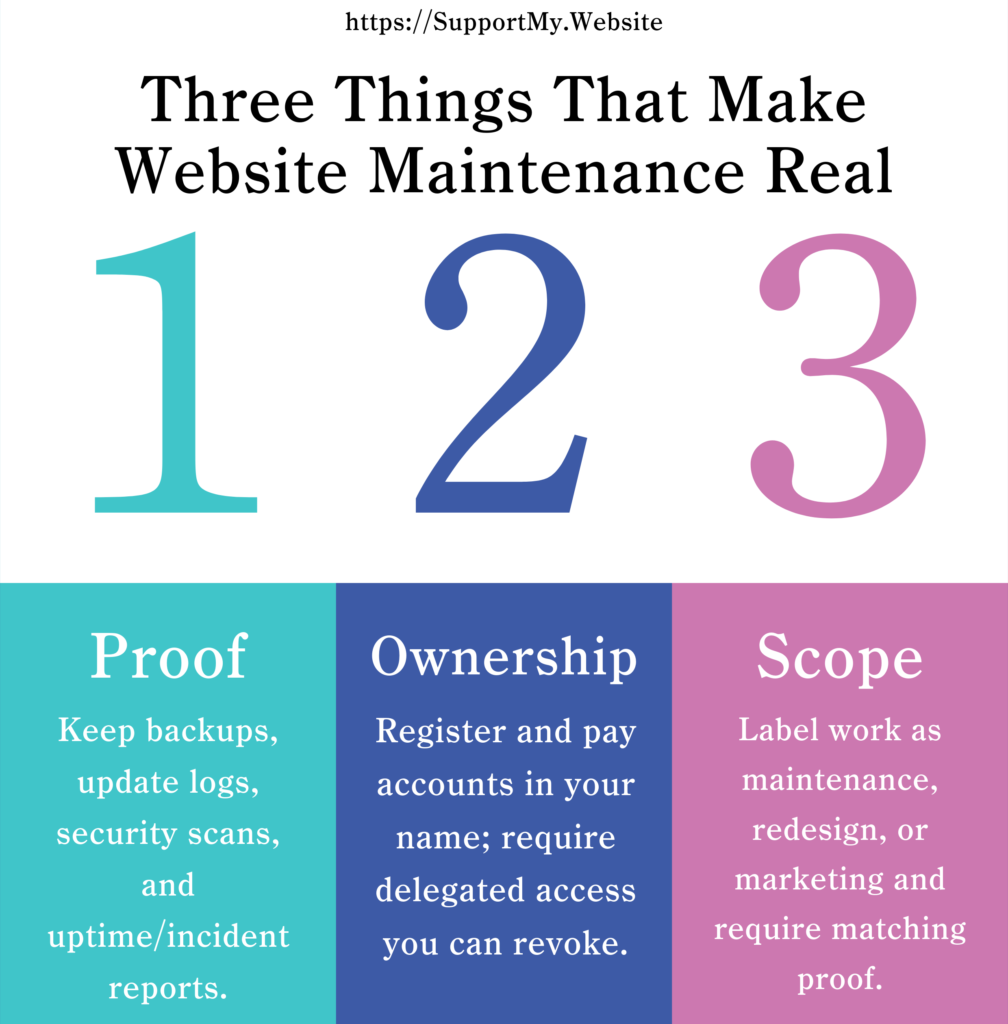
Proof: Evidence that work actually happened
Real maintenance produces an audit trail: backup logs with timestamps, update records showing what was installed and when, security scan results, and uptime summaries with any incidents documented.
If your provider can't produce this evidence on request, one of two things is true: either the work isn't being done, or it's being done without record-keeping. Both are problems. You can't hold a provider accountable for work you can't confirm.
Ownership: Control of your accounts and access
You can't maintain what you don't control. If your provider registered your domain, hosts your site under their account, or holds the only admin credentials, you're one relationship breakdown away from losing access to your own business asset.
Ownership means every account is in your name, paid with your payment method, and accessible through credentials you hold. Providers get delegated access they can be removed from at any time. We cover how to set this up in the Access and Ownership section below.
Scope: Knowing what you're paying for
"Website work" is vague. Does your provider bill for "maintenance" when they're actually making content edits? Do they include "SEO maintenance" that amounts to glancing at your analytics once a month?
The three categories are:
- Maintenance keeps your existing site running: backups, updates, security monitoring, uptime tracking, form testing. Proof looks like monthly reports with logs and metrics.
- Upkeep changes how your site looks or functions: new layouts, restructured navigation, added features. Proof looks like design mockups, staging site previews, and before/after screenshots.
- Marketing brings people to your site: SEO content creation, ad campaigns, analytics setup. Proof looks like traffic reports, keyword rankings, and conversion data.
Before agreeing to any invoice, ask which category the work falls into. Our Website Maintenance Guide for 2026 has a full breakdown of service types.
Maintenance vs. Upkeep vs. Marketing (So You Don't Pay for the Wrong Thing)
Most surprise invoices come from scope confusion. You pay for one category and get billed for another, often due to vague proposals rather than bad faith.
| Category | What It Is | Typical Deliverables | What Proof Looks Like | Common Scope Trap |
|---|---|---|---|---|
| Maintenance | Keeping your existing site running, secure, and functional | Backups, software updates, security scans, uptime monitoring, form testing | Monthly report with backup logs, update lists, security scan results, uptime percentage, form test confirmation | Provider bills "maintenance" but actually made content changes or design tweaks you could have done yourself |
| Upkeep | Changing how your site looks, restructuring navigation, adding new features | Design mockups, staging site preview, list of pages/features changed, launch plan | Before/after screenshots, staging site link, project timeline with milestones | Small fixes (broken link, image swap, text edit) get quoted as "upkeep" when they're 10-minute edits |
| Marketing | Bringing people to your site, converting visitors, measuring results | SEO work (content creation, link building, technical fixes), ad management, email campaigns, analytics setup | Traffic reports, keyword rankings, conversion data, campaign performance dashboards | "SEO maintenance" or "monthly optimization" that's just someone reviewing Google Analytics (work you could do yourself in minutes) |
| Support | Responding when something breaks, answering questions, handling changes outside the plan | Ticketing/helpdesk, emergency fixes, troubleshooting, small change requests, vendor coordination | Ticket history with timestamps, actions taken, root-cause notes, resolution time, post-fix confirmation | "Unlimited support" that quietly excludes common issues or turns every request into a billable project |
Where small business owners get tripped up on scope
Scope traps recur in predictable patterns. The five below show up in invoice disputes month after month. Knowing each pattern makes it easier to push back when you see it.
Monthly SEO maintenance: This usually means someone logs into Search Console once a month and sends an invoice. Real SEO is content creation, technical fixes, and link building. That's marketing, not maintenance.
Security "includes SSL setup": Installing an SSL certificate is a one-time task and many auto-renew. Maintenance means keeping it valid, not billing for setup repeatedly.
"Site management" or "website care plans": Ask directly: does this cover backups and updates, or does it include content changes and new feature development? If they can't list explicit coverage, the scope is undefined.
Content updates: Changing text or publishing articles is content work, not maintenance. It requires client input and creative effort, which is why it's priced separately.
Emergency fixes: Emergency support often costs more than routine maintenance and may not be in your standard plan. Clarify what qualifies as an emergency before you need it.
Concerned about your current setup? Reach out and we can walk through it together.
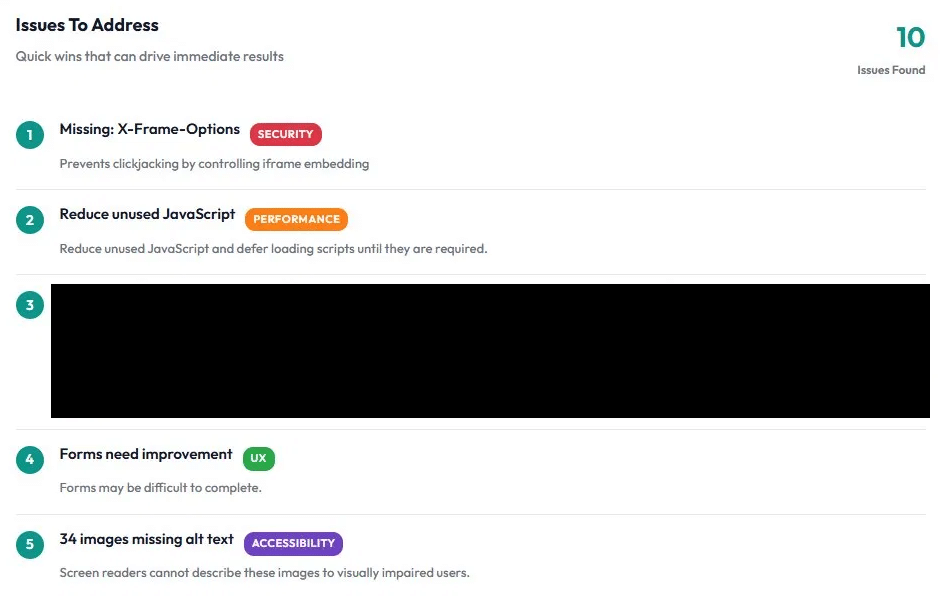
Example output from a free website assessment, with one issue redacted. A real diagnostic surfaces specific, named problems with categories and impact notes. A vague "all good" provider report is the contrast.
The contrast in the screenshot above is the point of this section. A diagnostic names problems by category and lets a business owner act. A monthly report that says "all good" or "site optimized" is not a diagnostic. It's a billing confirmation.
Copy-paste scripts to clarify scope
Before starting work:
"Can you confirm this falls under routine maintenance and not upkeep or marketing services? I want to make sure we're aligned on scope and pricing before we proceed."
When reviewing a proposal or invoice:
"Can you break down which tasks are monthly maintenance versus one-time setup or separate projects? I need to understand what I'm paying for in each category."
Access and Ownership
Access failures are the most common reason ongoing site support breaks down, and they have nothing to do with technical problems. When you don't control your own accounts, you can't verify work is happening, you can't switch providers cleanly, and you can't handle emergencies independently. CISA's recommendations on managed service providers address this clearly.
The must-have access list
Every account related to your website should be registered in your name or your business name, with your email address, and paid with your payment method. Providers get delegated access they can be removed from at any time.
- Domain registrar (GoDaddy, Namecheap, Squarespace, etc.): Full account access to see renewal dates, change nameservers, and initiate transfers. "Managed for you" access is not sufficient.
- DNS provider (often the same as your registrar, sometimes Cloudflare): Login credentials to view and edit DNS records. DNS controls where your traffic goes.
- Hosting provider (SiteGround, WP Engine, Bluehost, Kinsta, etc.): Full account access including billing, server settings, and the ability to download your own backups.
- CMS admin (WordPress, Shopify, Wix, etc.): Admin-level access, not editor or contributor. Keep your own admin account active. Never give anyone your only admin login.
- Google Analytics: Owner-level access, not just view-only. Owner status lets you add and remove other users.
- Google Search Console: Verified owner status so you receive site health alerts and control who else has access.
- Backup storage: Access to wherever backups are stored so you can download and restore them independently.
- Billing accounts: Every service should bill your payment method. You control renewals and cancellations.
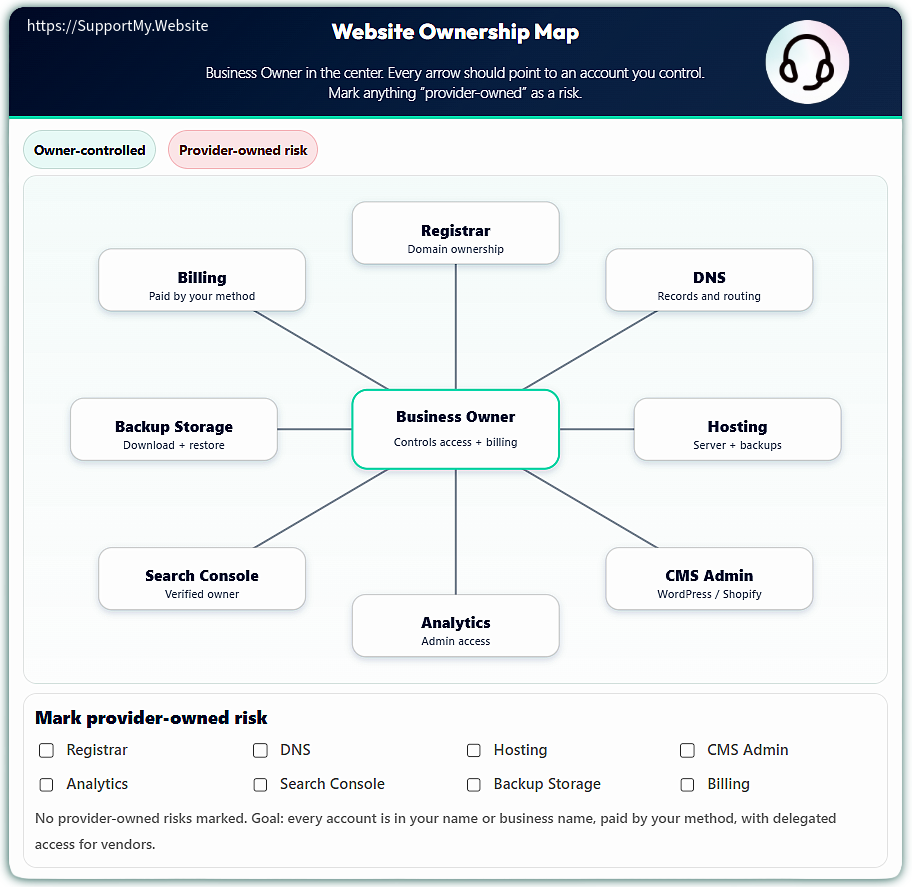
Website Ownership Map
Business Owner in the center. Every arrow should point to an account you control. Mark anything “provider-owned” as a risk.
The Website Ownership Map. Eight accounts every business owner should control.
How to store and share credentials
Use a password manager (1Password, Bitwarden, and LastPass are common options; the NCSC UK and Surveillance Self-Defense both publish evaluation guides). Don't store credentials in spreadsheets, sticky notes, or browser-saved passwords.
Create a dedicated folder for website-related accounts. When granting a provider access, use the password manager's secure sharing feature or create a new user account for them directly. Never send passwords over email. Revoke access the same day you end a working relationship. Designate a backup person who can access the password manager if you're unavailable.
Minimum rules to follow from day one:
- Never set up accounts using a provider's email address
- Never let a provider register your domain in their name
- Always maintain your own admin account in your CMS
- Review who has access quarterly and remove anyone who shouldn't
What to do if you don't have access today
If you're realizing right now that some of these accounts are in a provider's name, or you don't have credentials, you're not alone. The fix is a deliberate, documented request and, if that fails, escalation through the registrar, host, or platform directly.
The Monthly Proof Pack You Should Ask For
Recoverability
- Backup status summary: The date and time of the last successful backup, retention window, and where backups are stored. A backup that ran three weeks ago is not acceptable for an active business site.
- Restore test confirmation: At least one test restore per month or quarter, with a timestamp. A backup that has never been tested is an unknown quantity.
Security and integrity
- Updates summary: What was updated, what was deferred and why, and whether anything broke. Deferred updates need a documented reason.
- Security scan summary: What tool ran, what it found, what was remediated, and what (if anything) was accepted as known risk. "All clear" without a scan timestamp is not a scan summary.
Availability and revenue-critical functions
- Uptime report snapshot: Availability percentage for the month, any incidents, and the response time to those incidents.
- Critical path check confirmation: Your contact form or lead flow was tested and confirmed working. If you run e-commerce, checkout was tested. This W3C forms tutorial explains what makes web forms reliable.
What good evidence looks like vs. what to watch out for
Green flags: timestamps on every item, plain-English summaries, consistent cadence, and clear notes on what changed and what was deferred.
Yellow flags: vague language like "optimized," "monitored," or "reviewed" with no supporting artifacts.
Red flags: no timestamps, no mention of incidents or deferred work, no access to logs, or refusal to share reports.
Proof Pack Request Email
Subject: Please send this month's maintenance report
Hi [Name],
Can you send this month's Proof Pack so we can file it internally?
A short summary plus artifacts is perfect. At minimum:
- Backup status summary + restore test confirmation
- Updates summary (what changed, what was deferred and why)
- Security scan summary (findings and remediation)
- Uptime report snapshot (incidents and response times)
- Confirmation that the contact form or primary conversion flow was tested
If you already have a standard monthly report format, feel free to use it as long as it covers the above.
Thanks,
[Your Name]
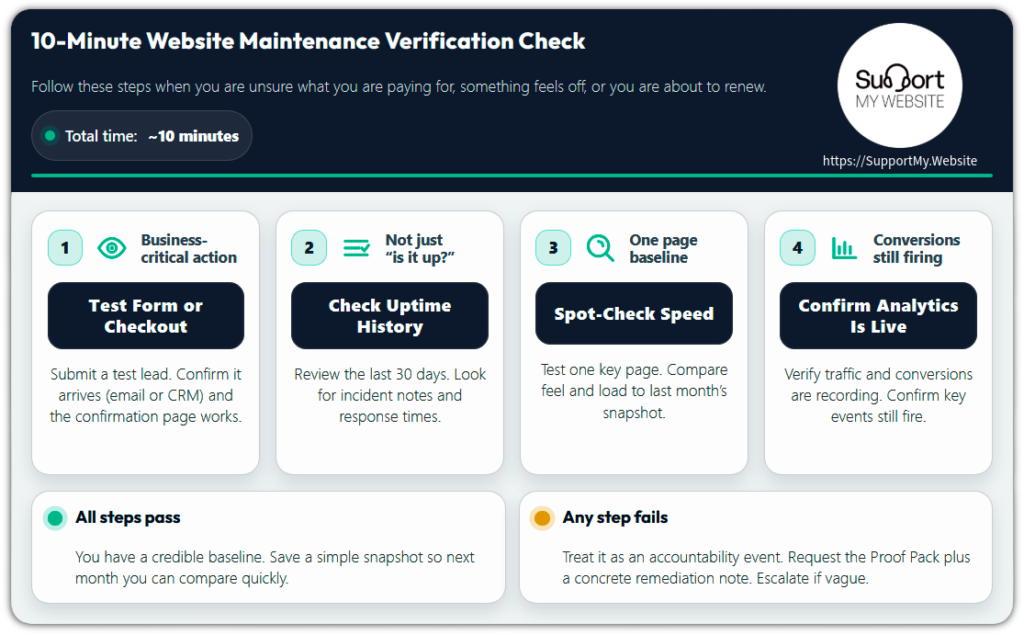
The 10-Minute Verification Check
Run this four-step check when you're unsure what you're paying for, something feels off (leads dropped, site feels slow), or before renewing another month of service. It's not a replacement for professional maintenance. It's a credibility check: if a step fails, report it and ask for proof of remediation.
10-Minute Website Maintenance Verification Check
Follow these steps when you are unsure what you are paying for, something feels off, or you are about to renew.
Submit a test lead. Confirm it arrives (email or CRM) and the confirmation page works.
Review the last 30 days. Look for incident notes and response times.
Test one key page. Compare feel and load to last month’s snapshot.
Verify traffic and conversions are recording. Confirm key events still fire.
All steps pass
You have a credible baseline. Save a simple snapshot so next month you can compare quickly.
Any step fails
Treat it as an accountability event. Request the Proof Pack plus a concrete remediation note. Escalate if vague.
The 10-Minute Verification Check is a four-step audit any small business owner can run today.
Step 1: Test the business-critical action
Submit your contact form or checkout lead flow. Pass: you receive the email, it appears in your CRM, and the confirmation page loads correctly. Fail: no email, an error message, or the confirmation page loops. Message to send if it fails: "I tested the contact form at [time/date] and did not receive the submission. Please confirm receipt and tell me what failed and what you changed to fix it."
Step 2: Check uptime history
Look at your uptime monitor report or your host's status history for the last 30 days. Pass: no unexplained outages, and any incidents have documented notes and response times. Fail: outages with no notes or no monitoring at all.
When Cloudflare experienced a significant internet outage, businesses with active monitoring knew immediately. Those without it found out from customers. Message to send if it fails: "Please send the uptime report for the last 30 days and note any incidents and response times."
Step 3: Spot-check speed on one key page
Test your homepage or top landing page and compare it to how it felt last month. Pass: loads normally and feels consistent. Fail: stalls, visible layout break, or noticeably slower. Deloitte's research indicates that milliseconds of load time have measurable impact on conversion rates. Message to send if it fails: "Performance feels worse than last month on [page]. Can you share our last performance snapshot and anything that changed this month?"
Step 4: Confirm tracking is still live
Open your analytics and confirm recent traffic and conversions are recording. Pass: data is current and conversion events still fire. Fail: traffic flatlines, conversions stop, or key events go missing. Message to send if it fails: "Analytics appears to have stopped collecting data on [date/time]. Please confirm whether tags were changed and restore tracking."
If any step fails, request the Proof Pack and a concrete remediation note. If you get vague responses, escalate using the decision table in the next section.
When to Escalate, Switch Providers, or Treat Something as an Incident
Use this decision table to triage maintenance issues. Each row maps a common failure or warning sign to a specific action and a timeline. Pressing for proof in writing creates a paper trail. Treating real outages as incidents drives faster resolution.
| If This Happens... | Then Do This... | Timeline |
|---|---|---|
| Provider didn't send monthly Proof Pack | Request it in writing: "I need this month's maintenance report with backup logs, update list, and security scan results by [3 days from now]." | Give them 3 business days |
| Provider sent vague report with no specifics | Reply: "This report doesn't include the proof I need. Please provide [list specific items from Proof Pack]. I need this by [3 days from now]." | Give them 3 business days to provide detail |
| Contact form or checkout not working | Treat as incident. Email immediately: "Critical issue: [form/checkout] is not working. I need this fixed within 4 hours and confirmation when it's resolved." | 4-hour fix window |
| Site completely down | Treat as incident. Call and email: "Site is down. This is a priority 1 incident. I need status updates every 30 minutes until it's resolved." | Immediate response expected |
| Provider refuses to provide access credentials after polite request | Follow the escalation playbook in our companion article on access recovery. Document your proof of billing ownership. | 3-day deadline |
| Provider still refuses access after escalation | Use the firm escalation steps in the access recovery playbook. Contact the registrar and host directly with proof of billing. Begin searching for a new provider. | 24-hour deadline, then proceed with ownership claim |
| Security scan found malware or infection | Treat as incident. The provider should clean it immediately and deliver evidence of removal. If they can't, hire a security specialist the same day. | Same-day response |
| SSL certificate expired | Treat as incident. Browsers will show "Not Secure" warnings and search rankings will be affected. Needs renewal within hours. | 4-hour fix window |
| Repeated small failures (forms work sometimes, site slow intermittently, reports often late) | Patterns indicate systemic problems. Send written notice: "I've noticed [list pattern]. I need a plan to prevent these recurring issues by [1 week from now], or I'll need to review our arrangement." | 1-week deadline for improvement plan |
| Provider becomes defensive or hostile when you request proof | Major red flag. Begin searching for a new provider now. Don't wait for the relationship to deteriorate further. | Begin transition planning immediately |
| You haven't received a single proof item in 3+ months | Assume maintenance is not happening. Request immediate documentation of all work completed in the last 90 days. If they can't produce it, they weren't doing it. | Search for a new provider now |
What to collect before switching providers
- Domain registrar credentials (confirm you can log in)
- Hosting credentials
- CMS admin login (confirm full admin rights)
- Most recent backup files (download locally)
- List of plugins and themes with current versions
- Google Analytics and Search Console access (confirm owner-level)
- Custom code or site configurations documented
- Third-party integration credentials (email marketing, payment processors, etc.)
- DNS records exported
- SSL certificate details and renewal date
With this list, you can onboard a new provider cleanly. Our Cost Guide covers evaluation and pricing.
Frequently Asked Questions
What is website maintenance for a small business?
Website maintenance for small business is the recurring technical work that keeps a site secure, functional, and available: software updates, security scans, automated backups, uptime monitoring, and form testing on a regular schedule. A legitimate provider documents this work and can produce evidence on request.
What is included in a small business website maintenance service?
A standard plan covers CMS and plugin updates, security scans, daily backups, uptime monitoring, and form testing. Higher tiers add performance optimization, analytics review, and dedicated content change hours. Our essential maintenance checklist provides a task-by-task breakdown.
How much should small business website maintenance cost per month?
Costs vary by site complexity, platform, and the level of support included. Foundation-level plans cover updates, security, and backups; higher tiers add content change hours, performance work, and priority support. Our Cost Guide covers current pricing models and what drives them.
What is the difference between website maintenance, upkeep, and marketing?
Maintenance keeps your site running through updates, backups, security, and uptime monitoring. Upkeep changes how it looks or functions. Marketing brings people to it. These are separate billing categories, and mixing them without clarity is where most invoice disputes start.
What is a Proof Pack?
A Proof Pack is the monthly documentation bundle your provider should deliver: backup status with timestamps, an updates summary, security scan results, an uptime report, and contact form test confirmation. The Proof Pack section above includes the request email.
What is the Website Ownership Map?
The Website Ownership Map lists the eight accounts every business owner should control: domain registrar, DNS, hosting, CMS admin, Google Analytics, Google Search Console, backup storage, and billing. If any are in a provider's name or paid with their payment method, you have a dependency risk. The Access and Ownership section covers how to audit and correct this.
How do I verify my website maintenance provider is actually doing the work?
Run the 10-Minute Verification Check: submit your contact form, check your uptime history for the last 30 days, spot-check one page for speed, and confirm analytics are recording. Then request a Proof Pack. If anything fails or the provider can't produce documentation, use the escalation table above.
What happens if I skip website maintenance?
Skipped maintenance creates compounding risk: software vulnerabilities go unpatched, backups stop running, and contact forms break without anyone noticing. An unmaintained site is easier to compromise and harder to recover from. The cost of fixing problems after the fact consistently exceeds the cost of preventing them.
Conclusion: Boring, Consistent, and Provable
Good website maintenance for small business is boring. Small problems get caught before they become emergencies. Nothing dramatic happens, because the work that prevents dramatic things is running quietly in the background.
Providers who do the work send proof: documentation, logs, timestamps, and artifacts you can independently verify. Providers who don't send vague invoices. Owning your accounts means you can leave a bad relationship without losing your business asset. Knowing your scope categories means you pay for what you need, not what's been bundled in. The arrangement is verifiable, your access is yours, and your scope is defined.
Make maintenance provable. Request a monthly Proof Pack. Test critical functions yourself. Keep credentials in your control. Know your scope categories. Escalate when documentation isn't provided.
Resources and Next Steps
Ready to verify your maintenance is actually happening? Request a free maintenance assessment to review your current setup, identify access or ownership gaps, and confirm what proof you're receiving (or not receiving).
Prefer professional help from a team that provides documentation by default? Learn about our professional website maintenance designed for non-technical business owners who want verification, not vague promises.
- Our essential maintenance checklist covers exactly what should be happening and what each task prevents.
- The maintenance task list (daily, weekly, monthly) provides the complete cadence.
- Our Cost Guide explains pricing models and what drives cost.
- Our WordPress-specific maintenance guide covers platform considerations.
- Our guide to choosing a website maintenance company covers what to look for.
- Provider won't hand over access? The access recovery playbook walks through email scripts, escalation steps, and what to do in extreme cases.
Downloadable infographics:
- 10-Minute Website Maintenance Verification Check Walkthrough
- Website Ownership Map: The eight accounts every business owner should control