


Your website went down at 2 a.m. on a Tuesday. By the time you found out Wednesday morning, you'd already missed a full day of contact form submissions, calls, and clicks from people who couldn't reach you. The site came back up. But the leads didn't. A working website maintenance checklist would have caught this before your customers did.
Most checklists stop at "here's what to do." This one goes further. Every task below includes what "done" actually looks like, how often it should happen, and the specific proof you should be able to request from whoever is handling it, whether that's you, a developer, or a managed support team.
If you're evaluating a provider, this checklist doubles as a vetting tool. If you're doing it yourself, it's a realistic schedule you can actually follow.
✓ Your Complete Website Maintenance Checklist
Check off each task you can verify (with logs or reports) to see your maintenance grade
For a broader look at what website maintenance services include and what they cost, see our complete guide to website maintenance services, costs, and packages.
How to Use This Website Maintenance Checklist
Work through this website maintenance checklist at whatever starting point makes sense for your site. If you're handing maintenance off to a provider, send them this document and ask them to confirm which items are covered under your plan. Any reputable team should be able to answer those questions specifically, not vaguely.
Each task section below follows the same four-part structure:
- Goal: what this task protects against
- Frequency: how often it needs to happen
- What "done" looks like: the standard to hold yourself or your provider to
- Proof to request: what you can ask to see as evidence it happened
A short, copy-and-paste message you can send your provider is included with each task.
The 8 Essentials: Quick Self-Grader
Below is a fast self-assessment of the eight tasks that separate a maintained site from a neglected one. Tick the items you can verify with logs, reports, or written confirmation. The expanded sections that follow cover these eight plus the additional tasks that complete a strong maintenance routine.
The Website Maintenance Checklist Schedule at a Glance
| Frequency | Tasks |
|---|---|
| Daily | Automated backups, uptime monitoring, critical security patching |
| Weekly | Security scans, software updates (core, plugins, themes), form testing, analytics review |
| Monthly | Performance optimization, broken link check, database cleanup, SEO performance review |
| Quarterly | Security audit, restore testing, content accuracy review, cross-browser and device testing |
| Annual | Domain and SSL renewal check, hosting review, legal pages update, year-over-year analytics review |
| Ongoing | Technical support, incident response |
Daily Maintenance Tasks
Automated Backups
Goal: Protect against data loss from server failures, botched updates, or security incidents.
Frequency: Daily, automated. Manual backups are not sufficient for sites that change regularly.
What "done" looks like: A complete copy of your site files and database is saved automatically every 24 hours to a location separate from your hosting server. If your host goes down, the backup survives. Multiple versions are retained for at least 30 days, and at least one backup is encrypted or access-controlled. The CISA #StopRansomware guidance is explicit on this: backups should be multiple, offline, encrypted, and regularly tested.
Proof to request: Backup logs showing daily timestamps, storage location confirmation, and the date of the last successful backup.
One-line message to send your provider: "Can you send me a screenshot of our backup log with the most recent timestamps and confirm where the backups are stored?"
A note on restore testing: taking daily backups is the baseline. But a backup you've never tested is one you've never trusted. Restore testing, meaning actually pulling a backup and confirming it works, should happen quarterly. We cover that under the quarterly section below.
Uptime Monitoring
Goal: Know the moment your site goes down, not hours later when a customer mentions it.
Frequency: Continuous. Monitoring checks should run every few minutes around the clock.
What "done" looks like: An automated monitoring service pings your site at regular intervals. When it fails to respond, an alert is sent immediately to whoever is responsible for the site.
Proof to request: Uptime reports showing availability percentage and any downtime incidents from the past 30 days, including duration and time of resolution.
One-line message to send your provider: "Can you pull our uptime report for last month and flag any incidents?"
For most small business sites, 99.9% uptime or better is a reasonable standard. That's less than 9 hours of total downtime per year.
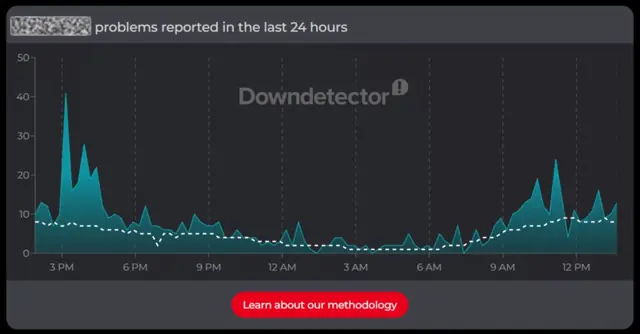
There are free third-party tools that help you verify whether a site is down. For more on diagnosing outages, see our detailed guide on why your website may be down, or keep revenue flowing when your site goes down.
Critical Security Patching (Out-of-Cycle)
Goal: Close known vulnerabilities the moment a patch is available, before automated scanners weaponize them against your site.
Frequency: As released, not scheduled. Some zero-day or actively exploited vulnerabilities require same-day response and should not wait for the weekly update window.
What "done" looks like: Your provider (or you) is subscribed to security advisories for your CMS platform and major plugins. When a critical patch is released, it's applied and tested within 24 hours, with a pre-patch backup taken first. This is distinct from the routine weekly update cycle described below: critical patches break out of the schedule because the schedule is too slow.
Proof to request: A log of emergency patches applied, with dates and the vulnerability each one addressed.
One-line message to send your provider: "How are you monitoring for critical security advisories, and how fast do you patch when one drops?"
Weekly Maintenance Tasks
Security Scans
Goal: Detect malware, injected code, and unauthorized changes before they affect visitors or trigger search engine blacklisting.
Frequency: Weekly minimum. Daily scans are preferable for sites handling sensitive data or transactions.
What "done" looks like: A security scanning tool runs a full check against your site files, database, and outbound links. Anything flagged is reviewed and addressed before the next scan cycle.
Proof to request: A weekly scan report showing date, scan scope, and results. If any issues were found, the report should include what was found and what action was taken.
One-line message to send your provider: "Can you send over last week's security scan report?"
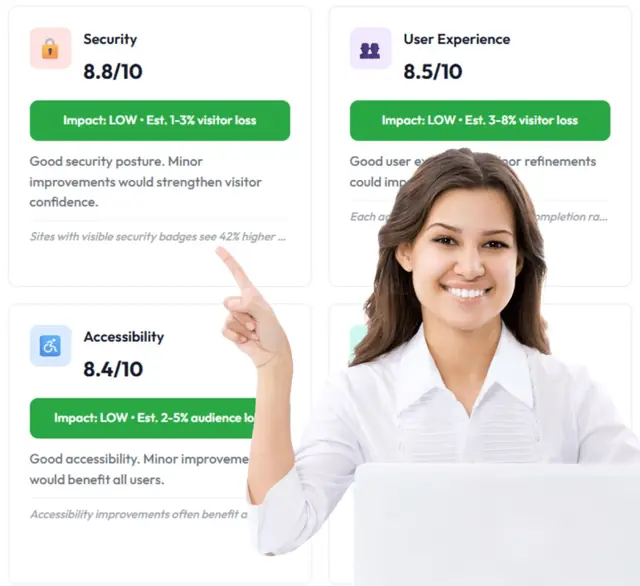
Example output from our free website assessment.
An unpatched plugin is one of the most common ways small business sites get compromised. Hackers don't typically target you specifically. They scan for any site running a known vulnerable version and exploit it automatically. Staying current is your first line of defense. One particularly common attack pattern is SQL injection, which exploits unsanitized form inputs and outdated database libraries.
Routine Software Updates: Core, Plugins, and Themes
Goal: Eliminate security vulnerabilities introduced by outdated software and maintain compatibility across your stack. This is the scheduled, non-emergency complement to the daily critical patching task above.
Frequency: Weekly review, with updates applied after testing.
What "done" looks like: Your CMS core, all active plugins, and your theme are running current, stable versions. Updates are not applied blindly. A competent provider will stage major updates (particularly theme updates and updates to plugins that affect forms, checkout, or layout) before pushing them to your live site. Inactive or abandoned plugins are removed rather than left dormant.
Proof to request: A monthly or weekly log of software versions updated, including what was updated, from which version to which version, and whether a staging test was performed.
One-line message to send your provider: "Can you send a summary of what was updated this week and confirm whether anything was staged first?"
If you're on WordPress specifically, see our deeper guide on WordPress-specific maintenance considerations.
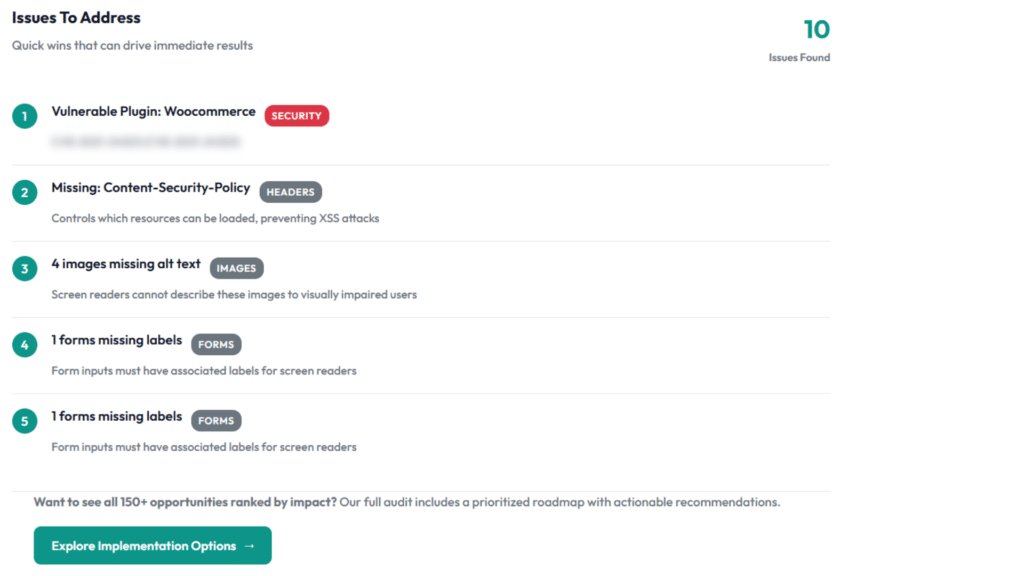
Outdated software is the root cause of most website hacks on small business sites. Google's own page experience documentation also flags software-driven performance issues as a ranking factor, so this task pulls double duty: security and search visibility.
Form Testing
Goal: Confirm that every lead-generating form on your site is submitting correctly and that responses are reaching the right inbox.
Frequency: Weekly for lead-gen sites. Monthly for brochure-style sites with minimal form activity.
What "done" looks like: Each active form (contact, quote request, appointment booking, newsletter signup) is submitted with test data. The submission is confirmed to reach the correct destination, whether that's an email inbox, CRM, or notification system.
Proof to request: A log of form tests completed, with dates and confirmation that each form's delivery was verified.
One-line message to send your provider: "When did you last test our contact form, and can you confirm the submission went through to our inbox?"
Broken forms are one of the quietest ways to lose business. The form looks fine on your end. The visitor fills it out. Nobody receives it. There's no error message. You never find out unless someone follows up another way, and most people don't.
Analytics Review for Anomalies
Goal: Catch sudden drops in traffic, spikes in bounce rate, or drops in conversions that signal a site problem or an SEO issue.
Frequency: Weekly review of core metrics.
What "done" looks like: A brief check of traffic volume, top landing pages, bounce rate, and any conversion goals you're tracking. You're not running a deep analysis every week. You're looking for anything that changed significantly from the week prior.
Proof to request: A weekly or monthly snapshot of key metrics, with notes on anything that moved materially.
One-line message to send your provider: "Have you seen anything unusual in our analytics over the past week?"
Monthly Maintenance Tasks
Performance Optimization
Goal: Keep page load times fast, which directly affects bounce rate, time on site, and search rankings.
Frequency: Monthly review and optimization pass.
What "done" looks like: Images are compressed and correctly sized. Caching is configured and functioning. The database is clean (see database cleanup below). No unnecessary scripts are loading on pages where they aren't needed. Core Web Vitals, specifically Largest Contentful Paint, Interaction to Next Paint, and Cumulative Layout Shift, are within Google's recommended ranges.
Proof to request: A before-and-after PageSpeed Insights score or a Core Web Vitals report from Google Search Console, ideally comparing month over month.
One-line message to send your provider: "Can you run a PageSpeed Insights check and share the current scores for mobile and desktop?"
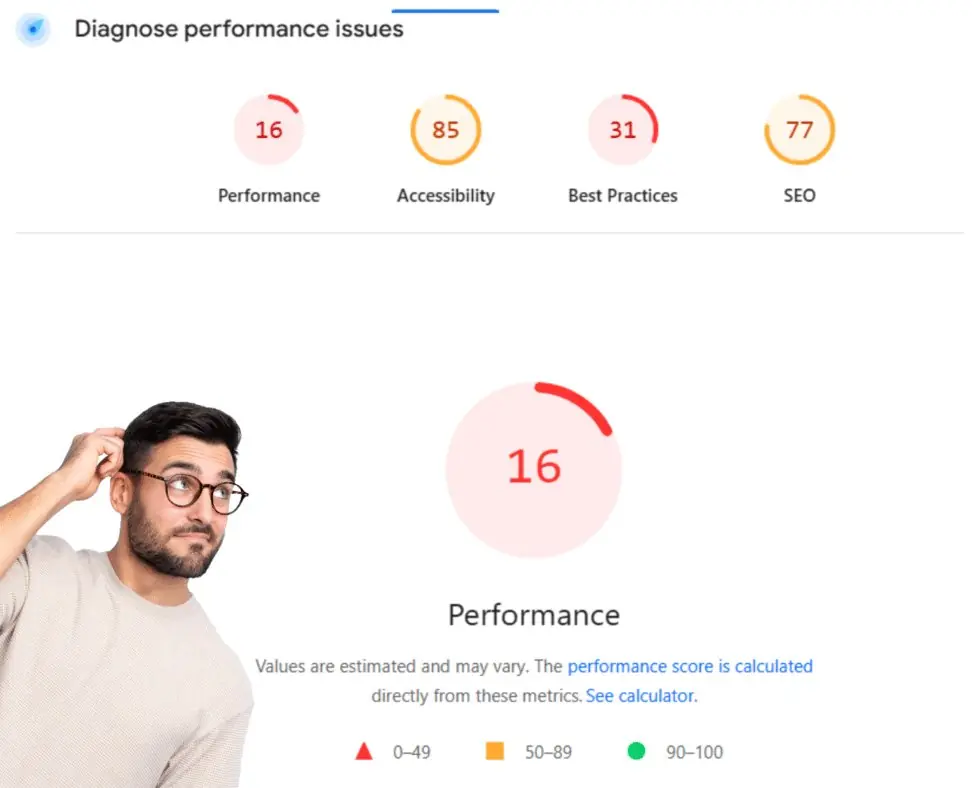
A 1-second improvement in load time can meaningfully reduce bounce rate. Google has been explicit since 2010 that site speed is a ranking factor. For small business sites, speed is often the easiest win on the table.
Broken Link Checks
Goal: Remove dead links that frustrate visitors and signal to search engines that your site isn't well maintained.
Frequency: Monthly.
What "done" looks like: Every internal and external link on your site has been checked. Any links returning 404 errors or pointing to pages that have moved are either updated to the correct destination, replaced with a better alternative, or removed.
Proof to request: A broken link report listing URLs checked, errors found, and the corrective action taken.
One-line message to send your provider: "Can you send the broken link report from this month's maintenance pass?"
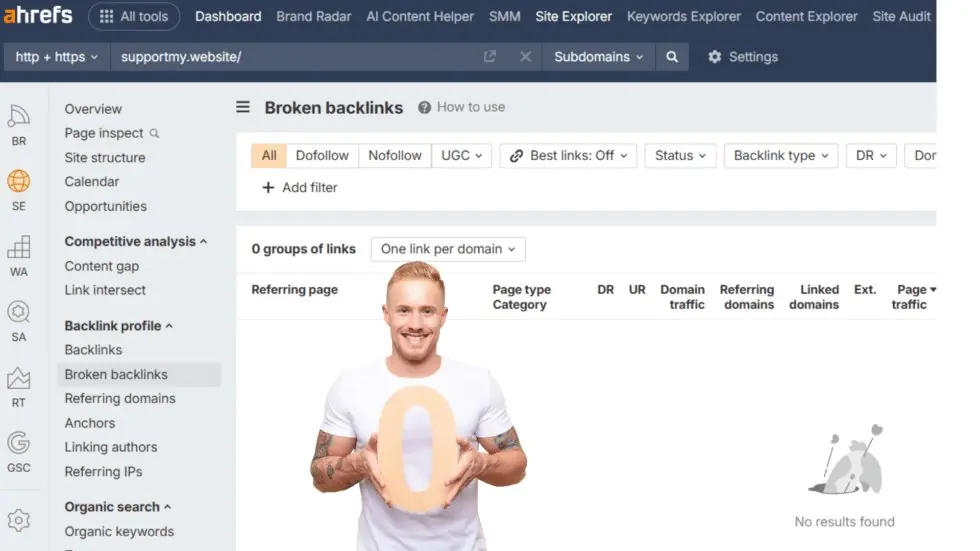
A popular resource page with 10 outbound links can quietly break over time as destination sites move or shut down. Visitors hit dead ends. The page becomes less useful. No one notices because no one is checking.
Database Cleanup
Goal: Remove accumulated junk data that slows down query performance and inflates backup file sizes.
Frequency: Monthly.
What "done" looks like: Post revisions, auto-drafts, spam comments, expired transients, and orphaned metadata are removed from your database. This is a routine housekeeping task, not a one-time fix.
Proof to request: Confirmation that a database optimization pass was completed, including the date and, if your provider uses a tool that shows before/after file size, that comparison.
One-line message to send your provider: "Was the database cleanup run this month? Can you confirm the date?"
SEO Performance Review
Goal: Track whether your site's visibility in search results is improving, holding steady, or declining, so you can act on changes before they compound.
Frequency: Monthly.
What "done" looks like: A review of Google Search Console data covering impressions, clicks, average position, and any crawl errors or manual actions. Target keyword rankings are checked. If any pages have dropped significantly, there's a note on the likely cause.
Proof to request: A monthly GSC performance snapshot with notes on any meaningful changes.
One-line message to send your provider: "Can you pull our GSC performance data for last month and flag anything that moved significantly?"
Quarterly Maintenance Tasks
Security Audit (Access and Configuration)
Goal: Catch configuration vulnerabilities and unnecessary access that accumulates over time and isn't caught by routine scans.
Frequency: Quarterly.
What "done" looks like: User accounts are reviewed and any accounts belonging to former employees, contractors, or agencies are removed. Admin access is limited to people who actively need it. File permissions are audited. Your security plugin's firewall rules and login protection settings are reviewed and updated. Login attempts from suspicious IP ranges are assessed. The OWASP Top 10 (2025) elevated Security Misconfiguration to its #2 risk, noting that effectively all tested applications had at least one form of misconfiguration. Routine scans don't catch this; periodic audits do.
Proof to request: A quarterly security audit summary covering user accounts reviewed, permissions checked, and any changes made.
One-line message to send your provider: "Can you confirm the quarterly access audit was completed and let me know if any accounts were removed or permissions tightened?"
Restore Testing
Goal: Confirm that your backups actually work before you need them in an emergency.
Frequency: Quarterly.
What "done" looks like: A backup is pulled and restored to a staging environment. The restored site is verified to load correctly, with content, forms, and functionality intact. If a backup fails to restore cleanly, that's a problem you want to find now, not during a crisis.
Proof to request: Confirmation that a restore test was completed, including the date and the backup version used.
One-line message to send your provider: "When did you last do a restore test? Can you confirm the date and which backup was used?"
Having backups is table stakes. Knowing they work is the actual standard.
Content Accuracy Review
Goal: Ensure your site's information reflects your current business, pricing, team, and offerings.
Frequency: Quarterly.
What "done" looks like: Service pages, pricing information, team bios, and location or hours details have been reviewed and are accurate. Any outdated case studies, testimonials, or announcements have been updated or removed.
Proof to request: A checklist of pages reviewed, with notes on any changes made.
One-line message to send your provider: "Can you send a note on what was reviewed in the quarterly content audit and what was updated?"
Stale content erodes trust. A service page still showing last year's pricing, or a team page with someone who left, tells visitors you're not paying attention to your own site.
Cross-Browser and Device Testing
Goal: Verify that your site functions correctly across the major browsers and screen sizes your visitors actually use.
Frequency: Quarterly, and after any major update to your theme or a key plugin.
What "done" looks like: Your site has been tested on Chrome, Safari, Firefox, and Edge, as well as on iOS and Android mobile browsers. Navigation, forms, and interactive elements work as expected on each. Layout doesn't break on small screens.
Proof to request: A short cross-browser test log, or screenshots of the site rendered on at least 3 environments.
One-line message to send your provider: "Was cross-browser testing included in this quarter's maintenance? Can you send a quick summary of what was checked?"
Advanced Quarterly Reviews
Two strategic checks that separate good maintenance from great. Both connect maintenance work directly to revenue.
User Behavior Review
QuarterlyUnderstand why visitors leave, not just where. Analytics tells you what happened. Heatmaps and session recordings tell you why.
A heatmap and recording tool (Microsoft Clarity, Hotjar) is installed on high-value pages. The quarter's data has been reviewed for friction patterns, dead clicks, scroll drop-off, and form abandonment, with findings tied to specific page improvements.
A quarterly summary listing pages reviewed, top friction points identified, and any UX changes that came out of the review.
Can you share what came out of this quarter's heatmap review and any UX changes you'd recommend?
Conversion Funnel Review
QuarterlyIdentify where visitors drop out of your highest-value paths (contact, quote, checkout, booking). Every leak in the funnel is lost revenue.
Each primary funnel is mapped step by step in GA4. Conversion rates at each stage are compared to the prior quarter. Any stage with meaningful drop-off has a documented hypothesis and a planned test or fix.
A quarterly funnel report showing step-by-step conversion rates with prior-period comparisons, plus a short note on what's being tested or changed.
Can you pull this quarter's funnel report and flag where we're losing people compared to last quarter?
Annual Maintenance Tasks
Domain and SSL Renewal Verification
Goal: Prevent your site from going down or showing security warnings because a registration or certificate lapsed.
Frequency: Annual review, with renewal reminders set well in advance.
What "done" looks like: Your domain registration expiration date has been checked. Renewals are set to auto-renew or are manually calendared with at least 60 days' notice. Your SSL certificate is valid and renewing on schedule. You're not relying on a single email address to receive renewal reminders.
Proof to request: Confirmation of your domain expiration date and your SSL certificate's next renewal date.
One-line message to send your provider: "Can you confirm when our domain and SSL certificate are next up for renewal?"
A lapsed SSL certificate will display a browser warning to every visitor telling them your site is not secure. Most will leave immediately.
Hosting Review
Goal: Confirm that your current hosting plan still fits your site's traffic, performance needs, and budget.
Frequency: Annual.
What "done" looks like: You've reviewed your current plan's resources (storage, bandwidth, server response time) against actual usage. If you've outgrown your plan, or if your host's performance has declined, you've evaluated alternatives.
Proof to request: A hosting performance summary for the past 12 months, including average server response time and any resource limit incidents.
One-line message to send your provider: "Can you pull our hosting performance summary for the year and flag anything worth reviewing?"
Legal Pages Update
Goal: Keep your privacy policy, terms of service, and any compliance-related pages accurate and current.
Frequency: Annual minimum, and any time your data collection practices, tools, or service offerings change materially.
What "done" looks like: Privacy policy, terms of service, cookie policy, and any accessibility or disclaimer pages reflect your current practices and the tools you're using. If you've added a new analytics platform, email marketing tool, or payment processor in the past year, those are documented.
Proof to request: Confirmation that legal pages were reviewed, with a note on any updates made.
One-line message to send your provider: "Were our legal pages reviewed this year? Can you confirm what was updated?"
Year-over-Year Analytics Review
Goal: Understand how your site performed across the full year compared to the prior year, so you can make informed decisions about where to invest.
Frequency: Annual.
What "done" looks like: A report covering total sessions, organic traffic, top-performing pages, lead volume (if tracked), and any significant trends. Year-over-year comparisons are included. There's a brief interpretation of what the numbers mean for your business, not just a data dump.
Proof to request: An annual analytics report with YoY comparisons and at least a short written summary.
One-line message to send your provider: "Can you put together an annual analytics report comparing this year to last year, with a short summary of what moved and why?"
Ongoing: Technical Support and Response Expectations
Scheduled maintenance handles the predictable. Technical support handles everything else.
Things break outside of maintenance windows. A plugin update conflicts with your theme at 10 p.m. on a Friday. A form stops submitting after a hosting configuration change. A page throws a 500 error for no obvious reason. These aren't failures of the maintenance schedule. They're the normal operational reality of running a website.
What matters is how fast someone responds and how clearly they communicate.
What reasonable support looks like:
- Response within a few hours for non-critical issues during business hours
- Same-day acknowledgment and action for site-down or revenue-impacting issues
- Plain-language communication about what happened, what was done, and what was prevented going forward
What to ask before hiring a provider:
- What's your typical response time for a site-down situation?
- Do I have a direct line to the person working on my site, or do tickets go into a queue?
- How do you communicate when something unexpected comes up during maintenance?
For more on what to look for when evaluating a provider, see our website maintenance companies guide.
Adjusting Your Website Maintenance Checklist by Site Type
Not every site needs the same schedule. Here's a practical guide:
Brochure-style sites (services, portfolios, info pages with minimal updates): Daily backups and uptime monitoring, weekly security scans and updates, monthly performance and link checks, quarterly everything else.
Lead-gen sites (forms driving calls or quote requests): Same as above, plus weekly form testing. Forms are your conversion mechanism. Test them on the same schedule as your security.
E-commerce or booking sites (transactions, appointments, payments): Tighten everything. Daily security scans, real-time uptime monitoring, more frequent restore testing (monthly rather than quarterly), and immediate response protocols for anything that affects checkout or booking functionality.
Bonus Checks Most Maintenance Plans Skip
These don't fit neatly into the schedule above, but they matter:
- 404 error audit: Beyond broken links on your pages, check what URLs people are actually landing on from external sources or old campaigns. Fix the important ones with redirects.
- Google Search Console manual actions: Check quarterly. A manual penalty from Google can tank your visibility and it won't announce itself.
- Third-party script audit: Ad pixels, chat widgets, and review tools all add load time. Audit them once or twice a year and remove anything you're no longer actively using.
- Accessibility check: A basic accessibility scan can surface issues that affect users with disabilities and, increasingly, search performance. Worth including in your annual review.
Hiring a Provider: Questions That Reveal Real Maintenance
These questions separate providers who describe maintenance from providers who actually do it:
- Can you show me a sample maintenance report from a current client? Look for task logs with dates, not vague monthly summaries.
- How do you handle plugin updates that break something? A staged environment and a rollback process are the right answers.
- What does your restore testing process look like? "We take daily backups" and "we test restores quarterly" are not the same thing.
- How do you communicate when something unexpected comes up? You want a specific answer, not a general one.
- Do you use a staging environment for major updates? Any reputable team should.
For more on what to look for when choosing a maintenance provider, see our small business website maintenance guide.
FAQ
What is a website maintenance checklist?
A website maintenance checklist is a structured list of recurring tasks (backups, security scans, software updates, performance checks, content reviews) organized by frequency. The strongest checklists also define what "done" looks like and what proof to request, so the work can be verified rather than just claimed.
How often should I do website maintenance?
Different tasks run on different cadences: daily backups and uptime monitoring, weekly security scans and software updates, monthly performance and link checks, quarterly restore testing and security audits, and annual hosting and legal reviews. E-commerce sites need tighter intervals than brochure sites.
Can I do website maintenance myself?
Yes for routine tasks. Most CMS platforms make backups, updates, and basic scanning accessible without deep technical skills. The harder part is doing it consistently, catching update conflicts before they affect the live site, and having a recovery plan. Many small business owners move to managed plans after a first incident.
What happens if I skip website maintenance?
Skipped maintenance compounds. Outdated plugins create security vulnerabilities. Slow pages drive bounce rates up. Expired SSL certificates trigger browser warnings. Undetected form failures mean missed leads. When something finally breaks, recovery costs almost always exceed what consistent maintenance would have cost.
What's the difference between website maintenance and website support?
Maintenance is scheduled and preventive: the recurring work that keeps your site healthy. Support is reactive: what happens when something breaks or a change is needed. Most managed plans include some support hours each month, but it's worth confirming exactly what each category covers before signing.
How much does website maintenance cost?
Cost depends on site complexity and what's included. Managed plans typically run as a monthly subscription, with prices scaling based on technical scope, support hours, and content update allowances. The cost of a managed plan almost always compares favorably to a single recovery incident. For specifics, see our pricing page.
Simple Next Steps
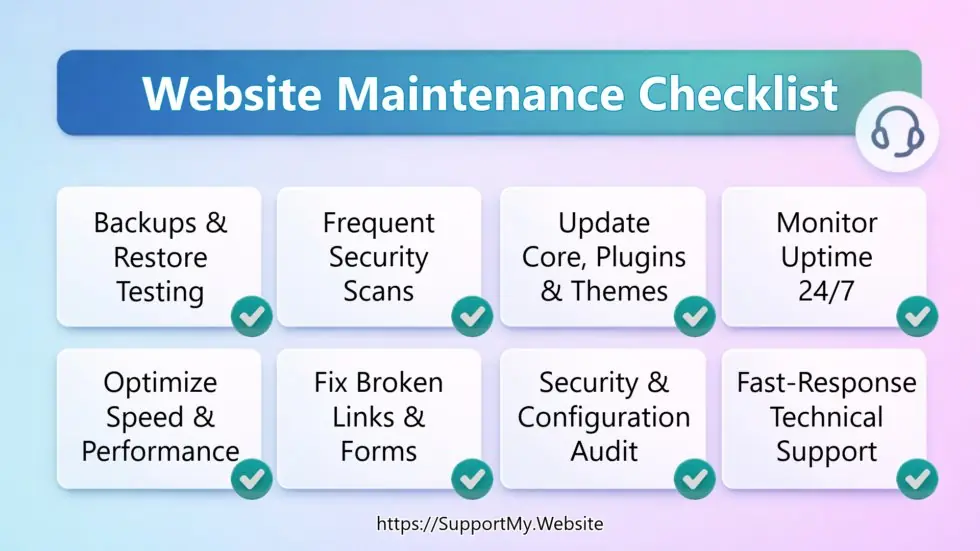
If you're not sure where to start, here's a practical three-step approach:
- Audit what you have. Look at when your last backup was taken, when software was last updated, and whether your forms are actually delivering submissions. These three things alone will tell you a lot.
- Set a minimum baseline. If you're handling this yourself: automated daily backups, weekly plugin updates, and monthly security scans are the floor. Everything else builds on top of that.
- Decide what to outsource. If you're spending more time worrying about your website than running your business, that's a signal. Most of the tasks on this checklist can be handled through a managed maintenance plan for a predictable monthly cost.
If you want us to handle this, here's how it works: we review your site, confirm what's currently in place, and set everything up under the right plan for your site type. You get a monthly report showing exactly what was done. View our maintenance plans and pricing or get in touch and we'll tell you what your site actually needs.