


What You Will Learn In This Article
This website maintenance guide offers a complete overview of keeping your site in top shape. Here's what you'll learn:
- What website maintenance actually involves and why it matters
- How much you should expect to pay (and what affects the cost)
- The connection between maintenance and your search rankings
- Whether to handle it yourself or hire professionals
- How to build a maintenance plan that prevents costly emergencies
Your Website Is Like A Car
Think of your website like your car. You wouldn't skip oil changes and expect it to run perfectly, right?
Your website works the same way. It needs regular attention to stay fast, secure, and effective. For small to mid-sized businesses, website maintenance plans often include services like regular software updates, security monitoring, backups, content revisions, and performance optimization. A basic maintenance plan might cover monthly backups and updates, while more comprehensive options could include weekly security scans, uptime monitoring, and support for minor website edits.
We've been maintaining websites for over 25 years, and here's what we know: the sites that get regular maintenance rarely have emergencies. The ones that don't? They're the ones calling us in a panic when something breaks at the worst possible time.
This guide will walk you through everything you need to know about website maintenance in 2026. We'll cover what it is, why it matters, how much it costs, and how to choose between doing it yourself or hiring professionals. By the end, you'll know exactly what your site needs and how to keep it running smoothly.
Understanding Website Maintenance in 2026
Website maintenance is the ongoing work that keeps your site healthy, secure, fast, and performing well. It's not a one-time thing. Think of it like maintaining your house: you don't just fix the roof once and forget about it. You've got regular tasks (like changing air filters) and bigger projects (like repainting every few years).
For business websites, this maintenance is important, especially if you depend on your website for leads and sales. Your site is often the first impression customers get of your business. If it's slow, broken, or that contact form isn’t working, that's the impression they're taking away.
Defining Website Maintenance for Modern Businesses
What exactly does website maintenance cover? Maintenance includes updating software, monitoring security, refreshing content, offsite backups, ADA compliance, 24/7 monitoring, contact form testing, making sure everything loads quickly and properly, and ongoing help whenever you need it. Additionally, some companies (like us) provide website analytics from traffic to SEO to mobile responsiveness and much more. For modern business websites, it's about more than just keeping the lights on. It's about staying competitive.
Here's what we mean by website maintenance in 2026:
Security updates: Installing patches and updates that protect your site from new threats Performance monitoring: Making sure your site loads quickly on all devices Content updates: Keeping information current and relevant for your visitors Backups: Creating safety copies so you can recover if something goes wrong Technical fixes: Resolving broken links, forms that don't work, and other issues
The goal is simple: make sure every visitor has a good experience, whether they're visiting from their phone, tablet, or computer. When your site works well, people trust you. When it doesn't, they go to your competitors.
Why Is Website Maintenance Critical and What Happens If You Skip It?
Skipping website maintenance is like ignoring that check engine light in your car. Sure, the car still runs... until it doesn't. And when it finally breaks down, the repair bill is way bigger than the regular maintenance would have been.
We see this all the time. A business owner thinks they're saving money by not maintaining their site. Then their site gets hacked, or it goes down, or Google penalizes them for being too slow. Suddenly they're paying thousands to fix problems that would have cost hundreds to prevent.
Here's what happens when you skip maintenance:
Your site gets slower: Old code and unoptimized images pile up. Pages that used to load in two seconds now take five or six. Most visitors leave before the page even loads.
Security vulnerabilities pile up: Hackers love unmaintained sites. They're easy targets. One outdated plugin can give someone access to your entire site, including customer data.
Your search rankings drop: Google cares about site speed and security. If your site is slow or has security issues, you'll drop in search results. That means fewer people find you.
Things break: Plugins stop working. Forms stop submitting. Payment processing fails. Each broken feature is a customer you're losing.
You lose data: Without regular backups, a server crash or hack could mean losing everything. All your content, customer data, years of work, gone.
The cost of fixing these problems always exceeds the cost of preventing them. Always.
The Impact of Website Downtime and Core Web Vitals
When your website goes down, you're losing money every minute it's offline. We've seen businesses lose thousands of dollars from just a few hours of downtime. Every visitor who tries to reach you and can't is a potential customer going to your competitor instead.
But it's not just about being online or offline. How well your site performs when it is online matters just as much. That's where Core Web Vitals come in.
Core Web Vitals are Google's way of measuring how good your site is for real people. They look at:
How fast your page loads: Most people expect a site to load in under two seconds. If it takes longer, they leave.
How quickly it responds: When someone clicks a button, how fast does something happen? Slow responses feel broken.
How stable the page is: Nobody likes when buttons move around while the page is loading. It's frustrating and makes people click the wrong thing.
Google uses these measurements to decide where to rank your site. Fast, stable sites rank higher. Slow, jumpy sites rank lower. It's that simple.
Regular maintenance keeps your Core Web Vitals in good shape. We optimize images, clean up code, and make sure your site stays fast. That means better rankings, more traffic, and more customers finding you.
Core Services Included in Website Maintenance Plans
When you sign up for a website maintenance plan, you're getting a bundle of services that work together to keep your site running smoothly. Think of it like a gym membership: instead of paying for each piece of equipment separately, you get access to everything you need.
Most professional maintenance plans include the essential services we're about to cover. These aren't optional extras. They're the foundation of good site health. Let's walk through what each one does and why it matters.
Security Monitoring and Management
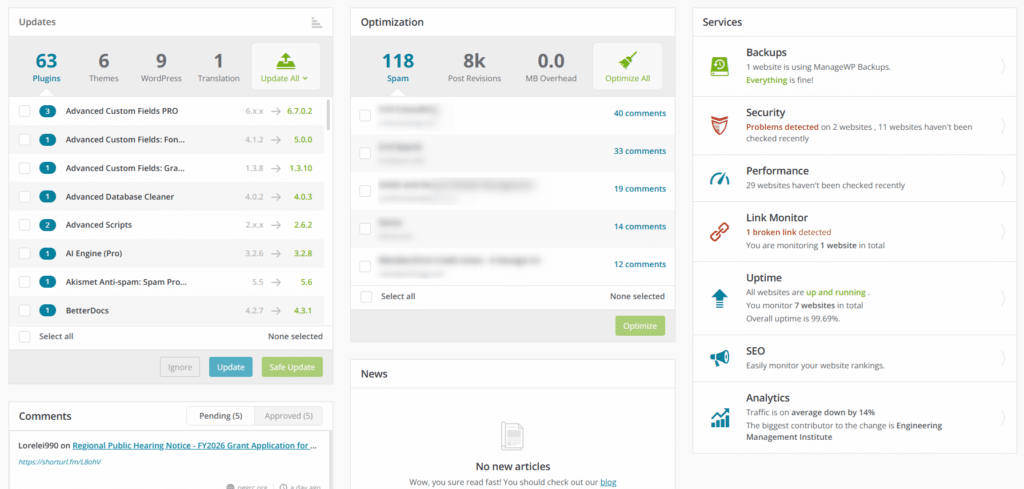
Security is the #1 reason we get emergency calls from businesses. Someone hacked their site, planted malware, or stole customer data. It's awful every time, and it's almost always preventable with proper website security maintenance.
Security monitoring means we're constantly watching your site for threats. We use tools that scan for malware, check for vulnerabilities, and alert us if anything suspicious happens. If we find a problem, we fix it before it affects your business.
Here's what security maintenance includes:
Daily malware scans: We check your site every day for malicious code. If we find something, we remove it and figure out how it got there.
Security updates: When WordPress or your plugins release security patches, we install them right away. These patches fix vulnerabilities that hackers exploit.
SSL certificate monitoring: That padlock in your browser bar? It comes from an SSL certificate. We make sure yours stays current and configured correctly.
Login security: We monitor failed login attempts, implement two-factor authentication, and block suspicious activity.
Think of it like having a security system for your house. You want it working all the time, not just when you remember to check it. We handle that monitoring for you as a part of standard website maintenance.
Performance Optimization Services
A slow website costs you money. For every second your page takes to load, you lose visitors. We've seen businesses double their conversion rates just by making their site faster. It's that important.
Performance optimization is about making your site as fast as possible. We look at everything that affects speed and fix it. This includes:
- Image optimization: Images are usually the biggest files on your site. We compress them without losing quality, so they load faster.
- Code minification: We remove unnecessary spaces and characters from your code. It's like removing fluff from a paragraph. The same information, less bloat.
- Caching setup: When someone visits your site, we can show them a saved version instead of building the page from scratch every time. It's way faster.
- Database optimization: Over time, your database gets cluttered with old data. We clean it up regularly so queries run faster.
- CDN configuration: A CDN (Content Delivery Network) stores copies of your site around the world. Visitors get content from a server near them, which is much faster.
We don't just make these changes once and forget about them. Performance optimization is an ongoing aspect of website optimization. As you add content and features, we make sure your site stays fast.
Content Updates and SEO Maintenance
Your content needs regular attention to stay useful for visitors and visible to search engines. Old, outdated information makes your site look neglected. Fresh, relevant content keeps people coming back and helps you rank better in search results.
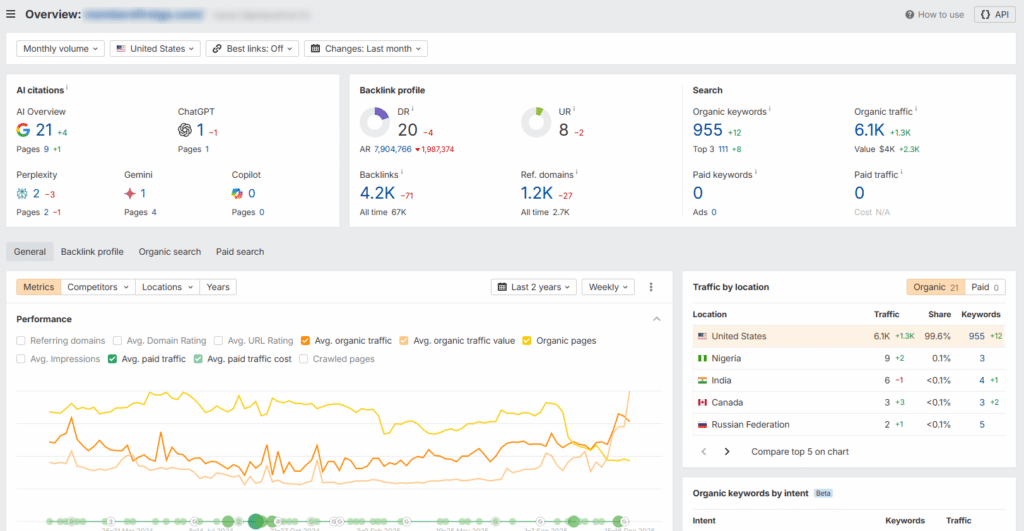
Content maintenance covers two main areas:
Keeping information current: Product details, service descriptions, contact information, team bios. All of this needs regular updates to stay accurate.
SEO improvements: We review your content for search optimization. This means updating meta titles and descriptions, targeting the right keywords, and making sure your content answers the questions people are searching for. A lot of companies don't consider SEO a part of website maintenance, but we do. Because if your site isn't ranking and you're just pouring money into ads to get traffic, that's money wasted.
Here's what we typically do:
- Update existing pages: We review your main pages quarterly and suggest updates to keep information current and relevant.
- Fix broken links: Internal and external links break over time. We check for these regularly and fix them.
- Optimize meta tags: These tell search engines what your pages are about. We make sure they're compelling and keyword-rich.
- Monitor keyword rankings: We track how you're ranking for important keywords and adjust strategy when needed.
- Add new content: If you're on a premium plan, we can write and publish new blog posts or pages regularly.
Think of content maintenance like tending a garden. You're not just planting once. You're weeding, pruning, and planting new things as seasons change.
Backup and Disaster Recovery Solutions
There are two kinds of people in the world. Those who do regular backups, and those who haven't lost all their data yet.
We've seen too many businesses learn this lesson the hard way. A server crashes, a hack wipes their database, or a bad update breaks everything. Without a recent backup, they're starting from scratch. With a backup, they're back online in an hour.
Backup services include:
- Automated daily backups: We back up your entire site every day, including your database, files, themes, plugins, and media.
- Off-site storage: Backups are stored in a different location from your live site. If your hosting server fails completely, your backups are safe.
- Easy restoration: If something goes wrong, we can restore your site to any previous backup point. Usually takes less than an hour.
- Backup testing: We regularly test backups to make sure they actually work. A backup that won't restore is useless.
- Long-term retention: We keep multiple backup versions, so you can go back days, weeks, or even months if needed.
How often you need backups depends on your site. An e-commerce store with hundreds of orders a day needs daily backups (maybe even more often). A simple information site that rarely changes might only need weekly backups.
We'll help you figure out the right schedule. The goal is simple: if something goes wrong, you can get back up and running fast with minimal data loss.
Essential Tasks for Effective Website Maintenance
Beyond the core services, there are specific tasks that need to happen regularly to keep your site in good shape. These tasks range from daily website maintenance checks to annual reviews. Let's walk through the most important ones.
Regular Software, Plugin, and Theme Updates
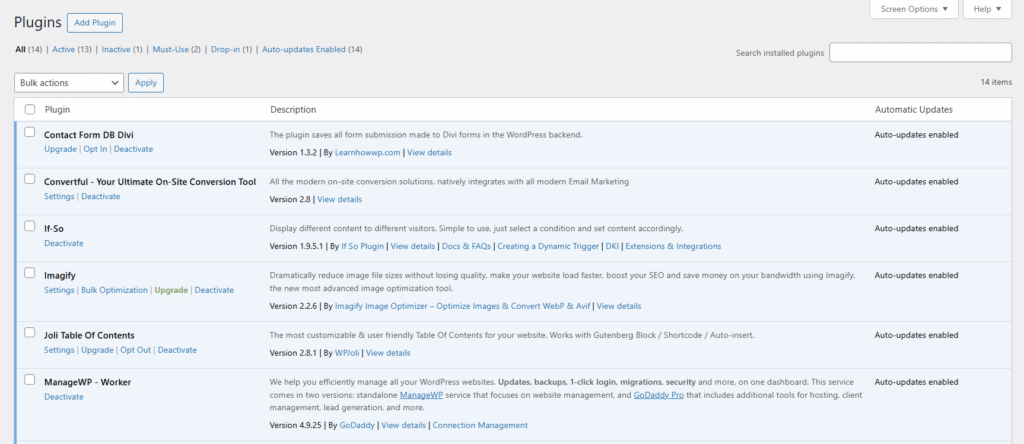
Your website runs on a stack of software. You've got WordPress (or another CMS), plugins that add features, and a theme that controls how everything looks. All of this software gets regular updates from developers.
These updates are important. They fix bugs, patch security holes, and sometimes add new features. When you skip updates, you're leaving vulnerabilities open for hackers to exploit.
- Here's why updates matter:
- Security patches: When developers discover a security flaw, they release an update to fix it. If you don't install it, hackers know about the flaw and how to exploit it.
- Bug fixes: Software has bugs. Updates fix them. Running old versions means living with bugs that have already been solved.
- Compatibility: WordPress, plugins, and themes need to work together. Updates ensure they stay compatible as other components update.
- New features: Sometimes updates add useful new features. You miss out on these improvements if you don't update.
The tricky part is testing. You can't just blindly update everything and hope it works. Sometimes updates break things. That's why we test updates in a staging environment first, then apply them to your live site once we know they're safe.
Broken Link Checking and Error Resolution
Broken links are frustrating for visitors and bad for SEO. When someone clicks a link expecting information and gets a "404 Page Not Found" error instead, they don't have a good experience. Some will leave your site entirely.
Search engines don't like broken links either. Too many of them signal that your site isn't well maintained, which can hurt your rankings.
We check for broken links regularly and fix them in a few ways:
- Update the link: If the destination page moved to a new URL, we update your link to point to the new location.
- Remove the link: If the destination doesn't exist anymore and there's no replacement, we remove the link entirely.
- Find an alternative: Sometimes we can find a better alternative resource to link to instead.
- Fix redirect chains: Sometimes links go through multiple redirects before reaching the final destination. This slows things down. We clean up these chains.
- Beyond broken links, we also look for other errors:
- Forms that don't submit: Contact forms, newsletter signups, and other forms need regular testing.
- Images that won't load: Missing or broken images make your site look unprofessional.
- JavaScript errors: These can break interactive features on your site.
- Database errors: Problems with your database can prevent pages from loading correctly.
We catch and fix these issues before your visitors encounter them.
Mobile Responsiveness and Cross-Browser Testing
More than half of web traffic comes from mobile devices now, and very often much more. If your site doesn't work well on phones and tablets, you're losing customers, it's that simple.
Mobile responsiveness means your site adapts to different screen sizes. Text stays readable. Buttons are easy to tap. Images scale properly. Navigation works smoothly. Everything adjusts to give a good experience regardless of device. This is a part of website maintenance that most companies don't cover (but we do).
We test your site regularly on different devices:
Phones: Various sizes, from small to large screens Tablets: Both portrait and landscape orientations Desktops: Different monitor sizes and resolutions
We also test across different browsers. Your site might look perfect in Chrome but broken in Safari. Or it might work great on desktop Firefox but have issues on mobile Firefox. We check all the major browsers:
- Chrome
- Safari
- Firefox
- Edge
- Mobile browsers (iOS Safari, Chrome Mobile)
If we find issues, we fix them. Your site should work well for everyone, regardless of what device or browser they're using.
Analytics and Uptime Monitoring
You can't improve what you don't measure. That's why analytics and monitoring are essential parts of website maintenance.
Analytics tell you what's happening on your site. How many visitors are you getting? Which pages are most popular? Where do visitors come from? How long do they stay? What actions do they take?
We monitor your key metrics and watch for changes:
- Traffic patterns: Are you getting more or fewer visitors? What's causing the change?
- User behavior: Which pages have high bounce rates? Where do people drop off in your sales funnel?
- Conversion rates: Are people taking the actions you want them to take?
- Traffic sources: How are people finding you? Organic search? Social media? Direct visits?
When we spot something unusual (a traffic spike or drop, a sudden increase in bounce rate), we investigate and let you know what's happening.
Uptime monitoring is different. It's about making sure your site is actually online and accessible. We use monitoring services that check your site every few minutes. If your site goes down, we get alerted immediately and can start fixing the problem.
Nobody expects 100% uptime. Even the biggest companies have occasional issues. But we aim for 99.9% or better. That means your site is down for less than 9 hours per year total. Most of our clients do much better than that.
Website Maintenance for WordPress and Other CMS Platforms
Different platforms have different maintenance needs. WordPress dominates the market (it powers about 40% of all websites), so we'll start there. Then we'll cover other popular platforms.
WordPress Maintenance Essentials
WordPress is powerful and flexible, but that flexibility comes with maintenance responsibilities. Because it's so popular, it's also a big target for hackers. Proper maintenance keeps your WordPress site secure and running smoothly.
Here's what WordPress-specific website maintenance involves:
Core WordPress updates: WordPress releases major updates a few times a year and minor security updates more frequently. We install these promptly and test to make sure everything still works.
Plugin management: The average WordPress site has 20-30 plugins. Each one needs regular updates. We keep track of all of them, update them when new versions come out, and deactivate any that are no longer maintained by their developers.
Theme updates: Your theme needs updates too. We handle these carefully because theme updates can sometimes change your site's appearance.
Database optimization: WordPress stores everything in a MySQL database. Over time, this database accumulates junk data (post revisions, spam comments, expired transients). We clean it up regularly to keep queries fast.
Comment spam management: If you allow comments, you'll get spam. We use anti-spam tools and regularly clean out spam comments.
Security hardening: We implement WordPress-specific security measures like changing the default login URL, limiting login attempts, and disabling XML-RPC if you're not using it.
PHP version updates: WordPress runs on PHP. As new PHP versions come out, we test your site with them and upgrade when it's safe. Newer PHP versions are faster and more secure.
The key with WordPress is staying on top of all these moving parts. A WordPress site that's been neglected for months can take hours to safely update. A site that gets weekly maintenance takes minutes.
Key Tasks for Shopify, Webflow, and Custom CMS
Not everyone uses WordPress. Let's talk about maintenance for other popular platforms.
Shopify Website Maintenance
Shopify is a hosted platform, which means they handle most of the technical website maintenance. But you still have responsibilities:
- Theme customizations need testing when Shopify updates
- Apps (Shopify's version of plugins) need regular attention
- Product inventory and descriptions need updates
- Payment and shipping settings need monitoring
- SSL certificate is automatic, but custom domain settings need occasional checks
The big advantage of Shopify is that security and performance are mostly handled for you. The disadvantage is you have less control.
Webflow Website Maintenance
Webflow is also hosted, so they handle infrastructure. Your maintenance focuses on:
- Content updates (easy to do yourself in Webflow)
- Form submissions and integrations
- CMS collections and dynamic content
- Custom code (if you've added any)
- Third-party integrations
Webflow sites tend to need less maintenance than WordPress because there are no plugins to update. But you still need to monitor performance and keep content current.
Custom CMS
If your site runs on a custom CMS built specifically for you, website maintenance depends entirely on how it was built. Generally you'll need:
- Server and database maintenance
- Security patches for any third-party libraries
- Feature updates and bug fixes
- Content management
- Performance monitoring
Custom systems can be powerful, but they require someone who understands how they were built. That's often more expensive than maintaining a standard platform.
Comparing Maintenance Needs Across Popular Platforms
Here's a quick comparison of what different platforms require:
Platform Maintenance Comparison
Complete guide to choosing the right CMS platform for your needs
| Platform | Maintenance Level | Flexibility & Control | Update Requirements | Security Risk | Monthly Maintenance Cost | Scalability | Best For | Key Advantages | Key Disadvantages |
|---|---|---|---|---|---|---|---|---|---|
| WordPress | High | Highest - Nearly unlimited customization | Core, plugins, and themes need regular updates (weekly) | Moderate to High if not maintained | $75-$500+ | Excellent - Handles small to enterprise sites | Complex sites, blogs, content-heavy sites, custom functionality | Massive plugin ecosystem, complete control, SEO-friendly, cost-effective for complex needs | Requires consistent maintenance, security vulnerabilities if neglected, can become slow without optimization |
| Shopify | Low | Low to Medium - Limited to Shopify's framework | Platform handles most updates automatically | Very Low - Enterprise-grade security | $100-$600+ | Good - Best for growing e-commerce | E-commerce businesses of all sizes | Built-in PCI compliance, automatic updates, excellent e-commerce features, reliable hosting | Monthly platform fees ($39-$399+), transaction fees (unless using Shopify Payments), limited customization outside themes |
| Webflow | Medium-Low | Medium - Visual design freedom within constraints | Platform handles infrastructure updates | Low - Hosted with good security | $50-$300+ | Good - Suitable for most business sites | Marketing sites, portfolios, small to medium business sites, designer-focused projects | Clean code output, visual design control, no plugin management, fast performance | Learning curve for CMS features, more expensive than some alternatives, limited backend functionality |
| Wix/Squarespace | Very Low | Very Low - Template-based with limited options | Fully automatic - No user action needed | Very Low - Fully managed | $35-$200+ | Limited - Best for small sites with modest traffic | Very small businesses, personal sites, basic portfolios, beginners | Extremely user-friendly, all-inclusive packages, no technical knowledge needed | Very limited customization, difficult to migrate away from, SEO limitations, professional sites may outgrow it quickly |
| Custom/Enterprise CMS | Variable (Often High) | Highest - Built to exact specifications | Depends on architecture - May need frequent custom updates | Variable - Depends on implementation | $500-$5,000+ | Excellent - Built for your scale | Large organizations, specific industry needs, high-security requirements, unique workflows | Perfect fit for unique needs, no compromises, complete control, can integrate with any system | Very expensive to build and maintain, requires specialized developers, longer development time, ongoing development costs |
The right platform depends on your needs, budget, and technical resources. We can help you figure out what makes sense for your situation.
Deep Dive Into Website Maintenance Cost Factors
Let's talk about money. Website maintenance costs vary wildly, from $25 a month to $5,000 or more. Understanding what drives these costs helps you make an informed decision.
Service Type and Provider Expertise
Who does your maintenance matters as much as what they do.
Freelancers typically charge $25-$100 per hour for website maintenance. You're paying for one person's time and expertise. This can work well if you find someone good, but you're dependent on that one person's availability and knowledge.
Agencies typically charge $100-$300 per hour, or offer packages from $100-$5,000+ per month. You're paying for a team with diverse expertise. If one person is on vacation or doesn't know something, someone else can help.
Managed hosting providers sometimes include basic website maintenance (automatic updates, backups, security) in hosting plans that cost $30-$100 per month. This works for simple sites but doesn't include things like content updates or custom work.
Experience matters. A senior developer who's been doing this for 10 years will charge more than someone who just started. But they'll also work faster, make fewer mistakes, and know how to handle tricky situations.
We've been maintaining websites for over 25 years. We've seen every kind of problem. That experience means we can usually fix issues in minutes that might take someone less experienced hours to solve. You pay a bit more per hour, but you need fewer hours.
Calculate Your Website Maintenance Cost
Get a personalized estimate in under 2 minutes. See what you should expect to pay based on your site's specific needs.
Website Size, Complexity, and Feature Set
A five-page brochure site is cheaper to maintain than a 500-page e-commerce store. That's obvious. But let's break down specifically what drives costs up:
Number of pages: More pages means more content to check, more links that can break, and more time needed for updates.
E-commerce functionality: Online stores need payment system monitoring, inventory management, order processing checks, and security is absolutely critical. This adds complexity and cost.
Custom features: Standard WordPress plugins are easier to maintain than custom-built features. If your site has custom code, whoever maintains it needs to understand that code.
Integrations: Does your site connect to a CRM? Email marketing platform? Accounting software? Each integration is another potential point of failure that needs monitoring.
Traffic volume: High-traffic sites need more robust hosting and careful performance monitoring. A site getting 10,000 visitors a day needs different maintenance than one getting 100.
Update frequency: If you need content updates weekly, that's more expensive than quarterly updates.
Here's a rough cost breakdown by site type:
- Simple brochure site (5-20 pages, mostly static): $50-$200/month
- Small business site (20-50 pages, blog, forms): $100-$300/month
- Medium business site (50-100 pages, more features): $200-$1500/month
- E-commerce site (any size): $300-$1,000+/month
- Enterprise or custom site: $1,000-$5,000+/month
How To Choose the Right Website Maintenance Service Provider
Not all website maintenance providers are created equal. Here's what to look for when you're choosing who to trust with your website.
Evaluating Credentials and Experience
Experience matters. A lot. We've been maintaining websites for over 25 years, and we're still learning new things. The web changes constantly. You want someone who's seen a lot and adapted to changes over time.
Here's what to check:
- Years in business: How long have they been doing this? A company that's been around for 10+ years has proven they can survive and adapt. They're not going anywhere.
- Technical certifications: Do they have relevant certifications? WordPress certifications, security certifications, performance optimization credentials? These show they've invested in their expertise.
- Portfolio and case studies: Can they show you examples of sites they maintain? Case studies that explain problems they've solved?
- Client testimonials: What do their current clients say? Look for specific praise, not generic "great service!" comments.
- Team expertise: Are they a solo freelancer or a team? Teams have diverse expertise and backup when someone's on vacation.
- Specialization: Do they specialize in your platform? WordPress experts know WordPress inside and out. Shopify experts know Shopify. You want someone who specializes in what you use.
Ask questions. A good provider will be happy to talk about their experience and show you proof of their expertise.
Key Qualities to Look For in a Website Maintenance Company
Beyond credentials, there are qualities that separate good website maintenance providers from great ones.
- Clear communication: They should explain technical issues in plain language. If everything they say sounds like jargon, that's a red flag. Good technical people can explain complex things simply.
- Proactive approach: Do they just fix things when they break, or do they monitor your site and catch issues before they become problems? Proactive is better.
- Transparent pricing: Their pricing should be clear and straightforward. No hidden fees. No surprise charges. You should know exactly what you're paying for.
- Responsive support: When you have a question or problem, how fast do they respond? Same day? Same hour? For critical issues, you want someone who responds immediately.
- Customized plans: One size doesn't fit all. They should be willing to create a plan that matches your specific needs, not force you into a rigid package that includes things you don't need.
- Regular reporting: You should get regular updates on what they're doing. Monthly reports showing what was done, what was found, and how your site is performing.
- No long-term contracts: While annual plans save money, you shouldn't be locked in if you're unhappy. Look for month-to-month options or annual plans with reasonable cancellation terms.
- Emergency support: What happens if your site goes down at 2am on a Sunday? Do they have 24/7 emergency support, or are you waiting until Monday morning?
Common Questions Business Owners Ask
We get asked the same questions a lot. Here are quick answers to the most common ones:
"Can't I just update things when I notice a problem?"
You could, but by then it's usually too late. Security vulnerabilities get exploited before you notice. Performance degrades gradually until your rankings drop. Proactive website maintenance prevents problems rather than fixing them after they've hurt your business.
"My site was built years ago and hasn't had maintenance. Is it too late?"
It's never too late, but catching up will cost more than if you'd been maintaining all along. We'll need to carefully update everything, fix any issues, and get you back on track. After that initial catch-up, regular website maintenance keeps things running smoothly.
"How do I know if my current website maintenance is any good?"
Ask your provider for reports. What have they done in the last three months? Can they show you performance metrics, security scans, update logs? If they can't produce clear evidence of work, you might not be getting good value.
"What if I'm happy with my hosting company's included website maintenance?"
Basic hosting and website maintenance is better than nothing, but it's usually just automated updates and backups. You're not getting security monitoring, performance optimization, content updates, or expert support. For many sites, that's not enough.
"How much maintenance does a brand new site need?"
Even a new site needs regular maintenance. Updates come out constantly. Security threats evolve. Performance needs monitoring. Start maintenance from day one rather than waiting until problems develop.
Website Maintenance Is Boring, But Someone Needs To Do It
Website maintenance isn't exciting. Nobody starts a business because they love updating plugins and checking security logs. But it's necessary, just like maintaining your car or your office building.
The good news is you don't have to do it yourself. Professional maintenance providers (like us) do this work every day. We know what to look for, how to fix issues quickly, and how to keep your site running smoothly so you can focus on your business.
Whether you choose DIY or professional website maintenance, the important thing is that you're doing it. Regular, consistent maintenance is what separates sites that thrive from sites that struggle.
If you have questions about any of this, want help figuring out what your site needs, or want to talk about our maintenance packages, we're here to help. No pressure, no sales pitch. Just honest advice from people who've been doing this for a long time.
Ready to get started? If you're doing it yourself, feel free to download our free website maintenance checklist and use it to audit your current site. It'll show you exactly what needs attention and help you decide on your next steps. If you're looking for help, give us a call (phone number is in the header)!
Have questions about website maintenance? Send us a message. We're always happy to help.